How pricing works
How your rate sheet turns a job into a price, and where prices are used.
Your rate sheet turns a job's facts (the service, the vehicle, the miles, the time of day) into a price. Exactly one rate sheet is live at a time, and every price TowPilot quotes comes from it.
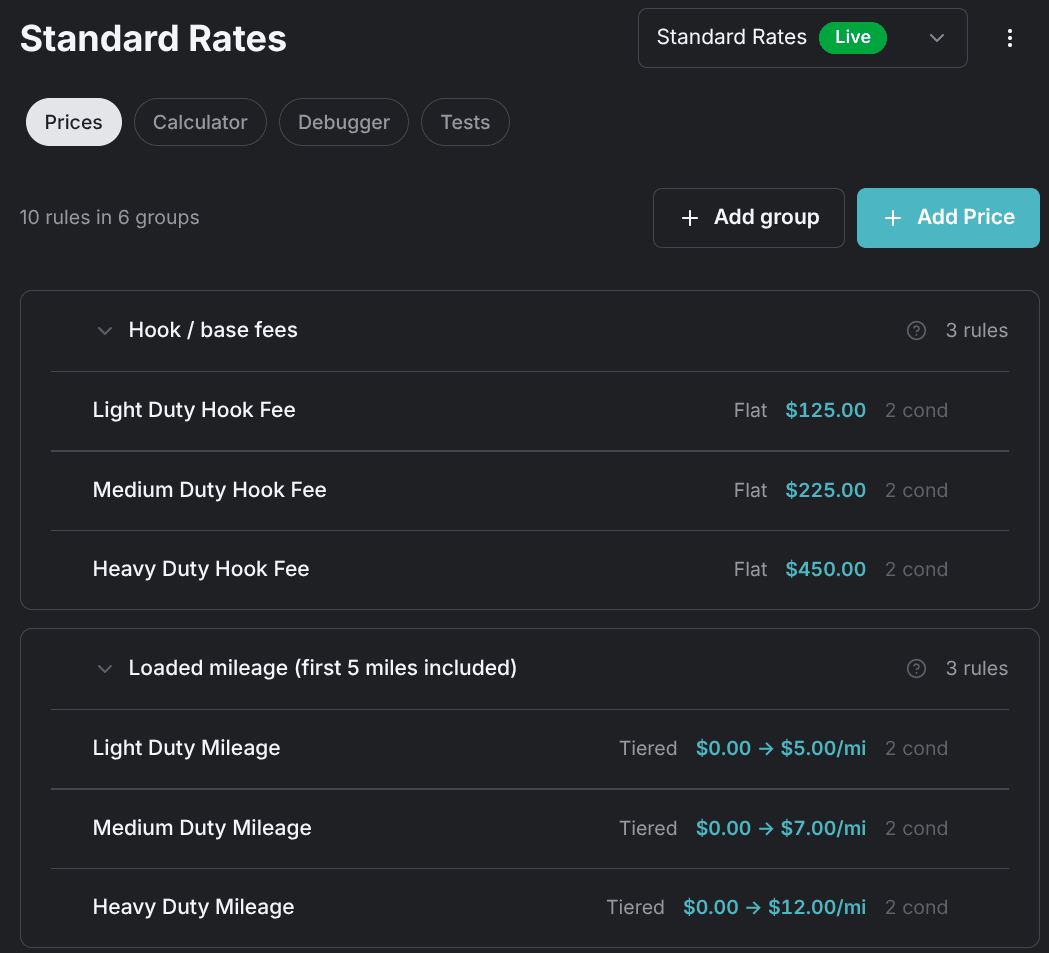
Go to Settings, then Pricing. The screen calls a rate sheet a pricing profile; the one in use carries a green Live badge.
How a price is built
A rate sheet is a stack of groups. Each group is one line on the bill: a hook fee, loaded mileage, a night surcharge. A group holds the rules that can fill its line.
A live rate sheet is built in three levels:
- Rate sheet — exactly one is live at a time.
- Group: Hook fee — one line on the bill.
- Rule: Light duty — the first rule that matches wins.
- Rule: Heavy duty
- Group: Loaded mileage — one line on the bill.
- Group: Night surcharge — one line on the bill.
- Group: Hook fee — one line on the bill.
Four properties decide every price:
- Every group is checked — each group adds its charge, so groups stack into the total. A group where nothing matches adds $0.00 and doesn't show on the quote.
- The first matching rule in a group wins — rules are checked in their order inside the group, and the rest are skipped once one matches.
- All of a rule's conditions must match — a rule with no conditions matches every job.
- Group order matters for surcharges — a percentage surcharge charges a percentage of the subtotal built so far, so it marks up only the groups that ran before it.
How a quote is computed
Every quote runs the same five stages, from the vehicle to the rounded total.
Classify the vehicle
TowPilot classifies the vehicle from its year, make, and model: motorcycle, light duty, medium duty, or heavy duty. A vehicle that can't be classified is priced as medium duty.
Measure the trip
TowPilot resolves the pickup and drop-off addresses to map locations and measures three legs. En route runs from your base to the pickup, loaded from pickup to drop-off, and deadhead from the drop-off back to your base. Their driving times add up to the job's estimated hours. Jump starts, lockouts, fuel delivery, and tire changes have no drop-off, so their loaded distance is zero and the deadhead runs from the pickup back to your base.
Check every group in order
Inside each group, the first rule whose conditions all match sets that line's charge.
Add the charges
Your rate sheet adds each group's charge to the running subtotal. A percentage surcharge is calculated on that same subtotal.
Round up
TowPilot rounds the total up to the next whole dollar. That's the figure a customer is quoted.
Where prices are used
The live rate sheet answers every price question in TowPilot:
- The price calculator — enter a job on the Calculator tab to see the price and the rules behind it. See Check a price and trace a quote.
- Phone quotes — the AI Agent quotes callers only when Let the AI quote prices is on (off by default) and a rate sheet is live. See Dispatch settings.
- The advisory price on a job — a new job with a service type, a pickup, and a drop-off where one is needed gets a price the moment it's created. The job keeps the full record of which rules fired.
Your dispatch provider bills from its own rates. A TowPilot quote never overwrites an invoice in your dispatch software.
Continue
Create your rate sheet
Start from your synced provider rates, generate with AI, or build from scratch.
Add and organize prices
Build your rate sheet with groups, tow rates, mileage, roadside fees, and surcharges.
Fine-tune prices with custom rules
Every calculation method and every condition on the custom price form, including account pricing.
Check a price and trace a quote
Check what a job would cost and see exactly which rules produced the number.
Change prices safely
How drafts, activation, and rollback work, plus every action in the rate sheet menu.
Avoid pricing traps
The rate sheet mistakes that misprice jobs or fail quotes, and the fix for each.