Add and organize prices
Build your rate sheet with groups, tow rates, mileage, roadside fees, and surcharges.
Prices live in groups on the Prices tab, and every group adds one line to the bill. Inside a group, the first price whose conditions all match is the one that charges. The full model is on How pricing works.
Go to Settings, then Pricing and stay on the Prices tab.
Groups
A group is one line of the bill: hook fees, loaded mileage, a night surcharge. The line above the group cards counts what you have (4 rules in 3 groups), and the group card header shows each group's name and its rule count.
- Add group — opens the Add price group dialog. Type a name and click Add group. The name is for you; customers don't see it. Plain words work best: Towing rates, Roadside services, After-hours surcharges.
- Rename — hover the group header and click the pencil. Press Enter to commit, Escape to cancel.
- Delete — hover the group header and click the trash icon. The confirmation says how many prices go with it, and deleting is permanent.
- Reorder — drag a group by its grip handle to move it up or down. Drag a price row the same way to reorder it inside its group or move it into another group. The new order saves on its own.
Group order decides which charges exist before the next group runs, which matters most for surcharges: a percentage only marks up the groups above it.
Adding a price
Click Add Price to open the type selector, headed What do you want to charge for?. Five cards cover every price you can add.
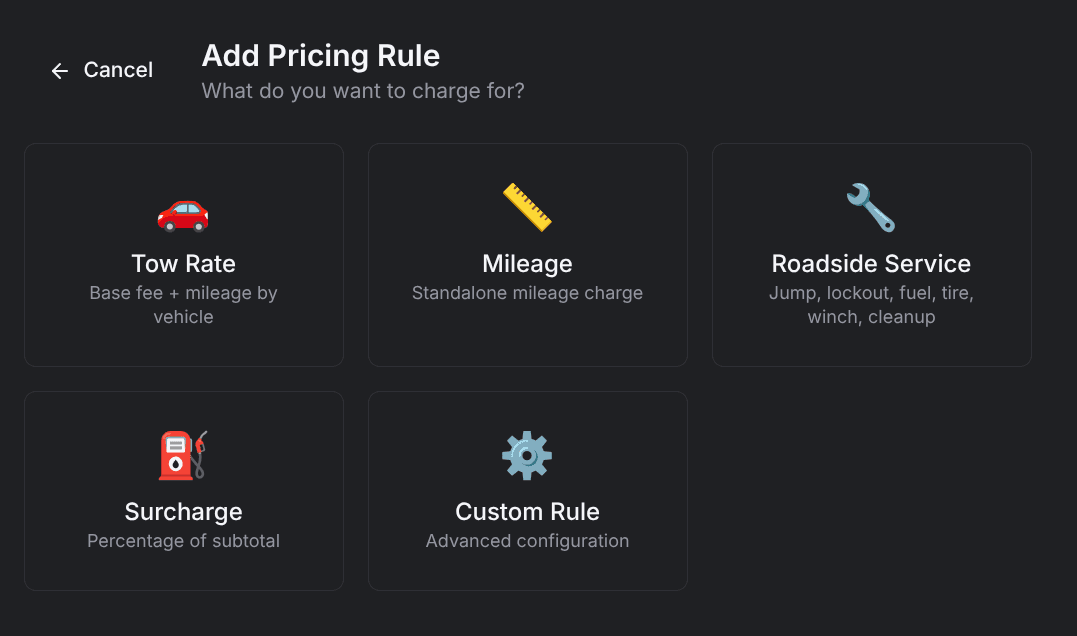
| Type | What it charges | Use it when |
|---|---|---|
| Tow Rate | Base fee plus mileage, by vehicle class | You're pricing a tow end to end |
| Mileage | One per-mile charge for one leg of the trip | You need mileage on its own |
| Roadside Service | A flat service fee for jump starts, lockouts, fuel, tires, winch outs, recovery, or cleanup | You're pricing a service call |
| Surcharge | A percentage of the subtotal so far | You're adding a night, fuel, or holiday markup |
| Custom Rule | One price with your own calculation and conditions | Nothing above fits |
Every builder starts with the same Group picker. It's preset to a group matching the type you picked (Towing, Mileage, Roadside, or Surcharges), and the last item, New group..., creates one on the spot. Saving without a group shows Pick a group.
Tow rates
The tow builder prices a whole tow for one vehicle class, on the New Tow Rate page.
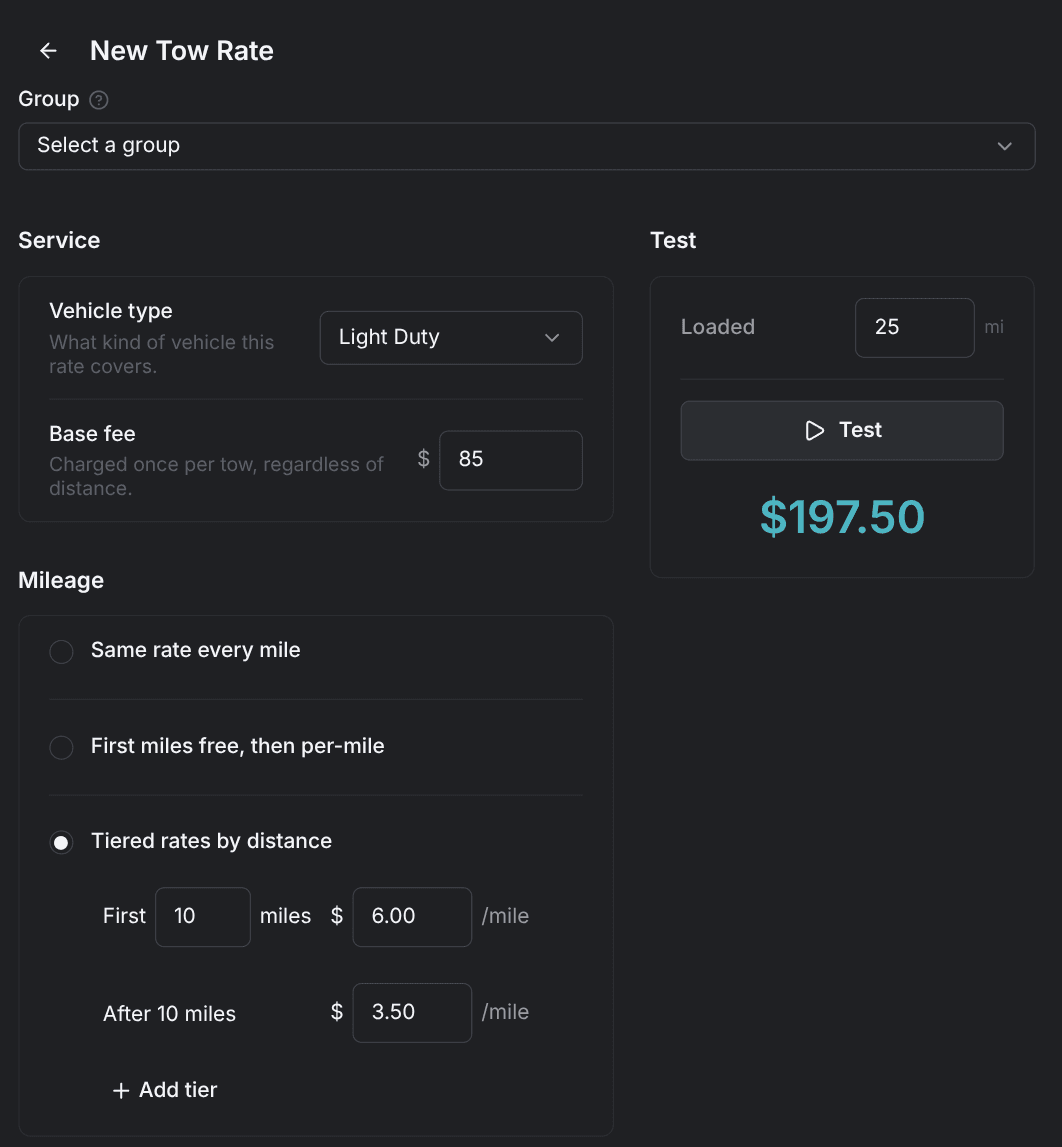
- Vehicle type — Light Duty, Medium Duty, Heavy Duty, or Motorcycle. Picking one fills in starting values you can overwrite.
- Base fee — charged once per tow, regardless of distance.
- Mileage — how the loaded miles are charged. Pick one:
- Same rate every mile — one rate for every loaded mile.
- First miles free, then per-mile — a free allowance, then a rate; the allowance starts at 10 miles.
- Tiered rates by distance — different rates by distance band, starting with a 0–30 mile band and an open-ended band above it.
- Charge for driving to pickup (optional) — adds mileage from your base to the pickup location, either at one rate or with a free allowance (5 miles to start).
- Charge for deadhead (optional) — adds mileage from the drop-off back to your base, on the same two choices (10 free miles to start).
The starting values per class:
| Vehicle type | Base fee | Per-mile rate |
|---|---|---|
| Light Duty | $85.00 | $4.00 |
| Medium Duty | $125.00 | $5.00 |
| Heavy Duty | $250.00 | $6.00 |
| Motorcycle | $75.00 | $3.50 |
One Save creates up to three prices: the base fee, the loaded mileage, and one for each extra you checked. All of them are limited to towing jobs for the vehicle class you picked.
Mileage
The mileage builder adds a single per-mile charge, on the New Mileage Charge page.
- Charge for — which leg the rate applies to: Loaded Miles (pickup to drop-off), En Route Miles (your base to the pickup), or Deadhead Miles (drop-off back to base).
- Pricing — Same rate every mile, First miles free then per mile, or Different rates by distance.
Distance bands are marginal: each band's rate applies only to the miles inside it, not to the whole trip.
Take a 25-mile loaded tow priced with the first 15 miles free, then $4.50 per mile:
| Line item | Amount |
|---|---|
| First 15 miles at $0.00 | $0.00 |
| Remaining 10 miles at $4.50 | $45.00 |
| Mileage line on the quote | $45.00 |
Only the miles past the free allowance are charged, so the line is $45.00, not the $112.50 you'd get by pricing all 25 miles at $4.50.
The last band has to be open-ended, or every mile past your highest band costs nothing. See Avoid pricing traps.
Roadside services
The roadside builder adds one flat fee for one service, on the New Roadside Service page.
- Service type — Jump Start, Fuel Delivery, Lockout, Tire Change, Recovery, Winch Out, or Cleanup. Picking one fills in its starting fee.
- Vehicle type — limit the fee to one class, or leave it at Any vehicle.
- Base fee — the flat charge for the service.
- Include en-route mileage (optional) — a per-mile charge from your base to the call, at one rate or with a free allowance ($2.00 per mile and 5 free miles to start).
- Include deadhead (optional) — a per-mile charge for the trip back to base.
| Service | Starting fee |
|---|---|
| Jump Start | $45.00 |
| Fuel Delivery | $55.00 |
| Lockout | $50.00 |
| Tire Change | $65.00 |
| Recovery | $150.00 |
| Winch Out | $125.00 |
| Cleanup | $75.00 |
Surcharges
A surcharge is a percentage of everything charged so far. Build one on the New Surcharge page.
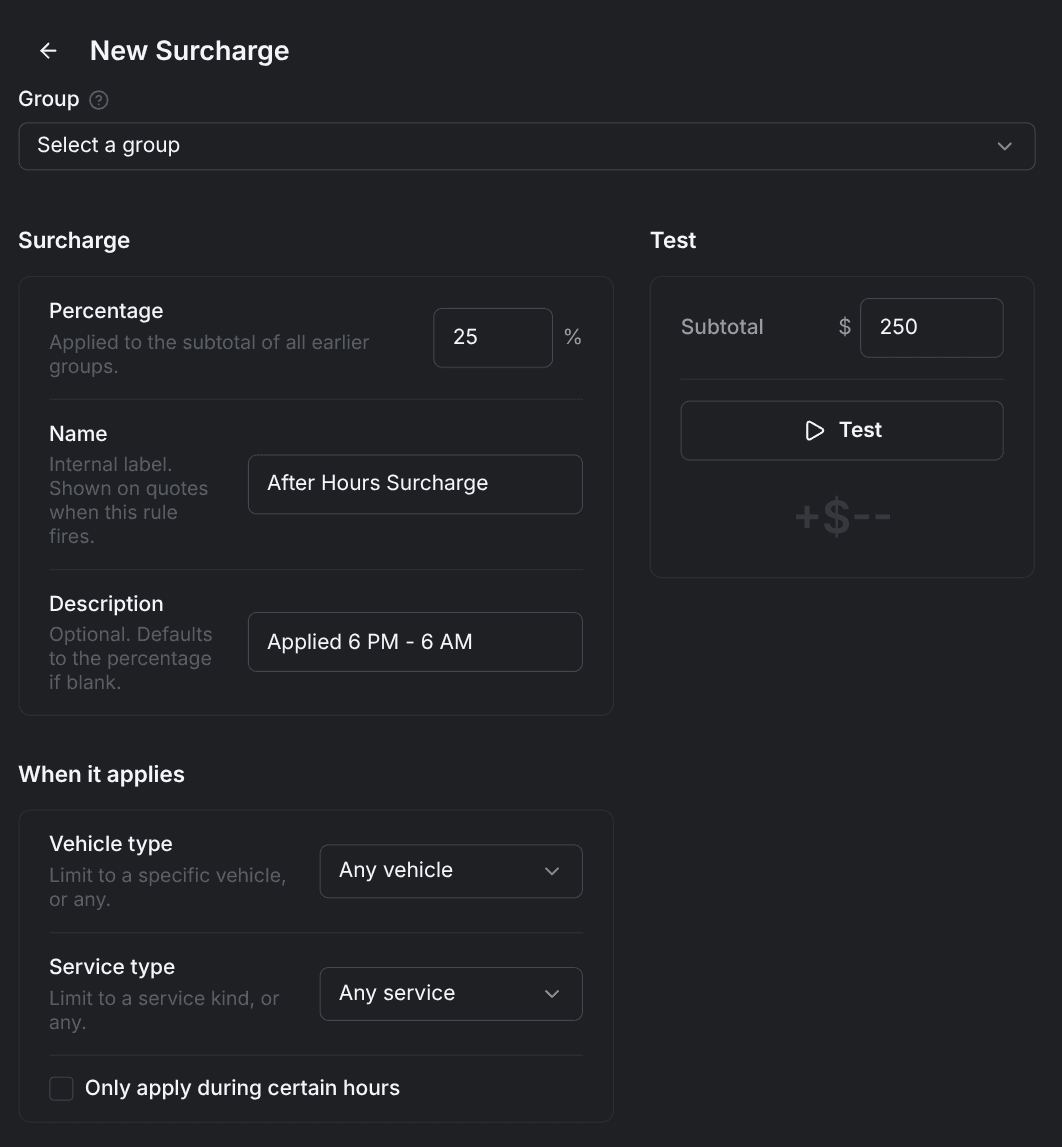
- Percentage (required) — from 0 to 100, in steps of 0.5; it starts at 10%.
- Name (required) — shown on quotes when the surcharge fires, for example Night Surcharge.
- Description (optional) — a note shown on the quote; blank means the quote shows the percentage.
- Vehicle type and Service type — limit the surcharge to one class or one service, or leave both at Any.
One surcharge per group
Give every surcharge its own group, ordered after the charges it should mark up. Two surcharges in the same group can't stack. Only the first one fires, and the second adds nothing.
Prices limited to certain hours
The four guided builders end with the same Only apply during certain hours checkbox. Turning it on reveals a From and to time pair, starting at 5:00 PM to 8:00 AM, and a Timezone picker. A summary line reads back the window you set.
Windows that cross midnight work as written, and both ends of the window count as inside it. The custom form has no such checkbox. Set hours there with the Time of day condition, which starts at 6:00 PM to 6:00 AM.
The window carries its own timezone, separate from your company timezone. A rule set to Eastern charges by Eastern clock time no matter where the job is.
Prices limited to an area
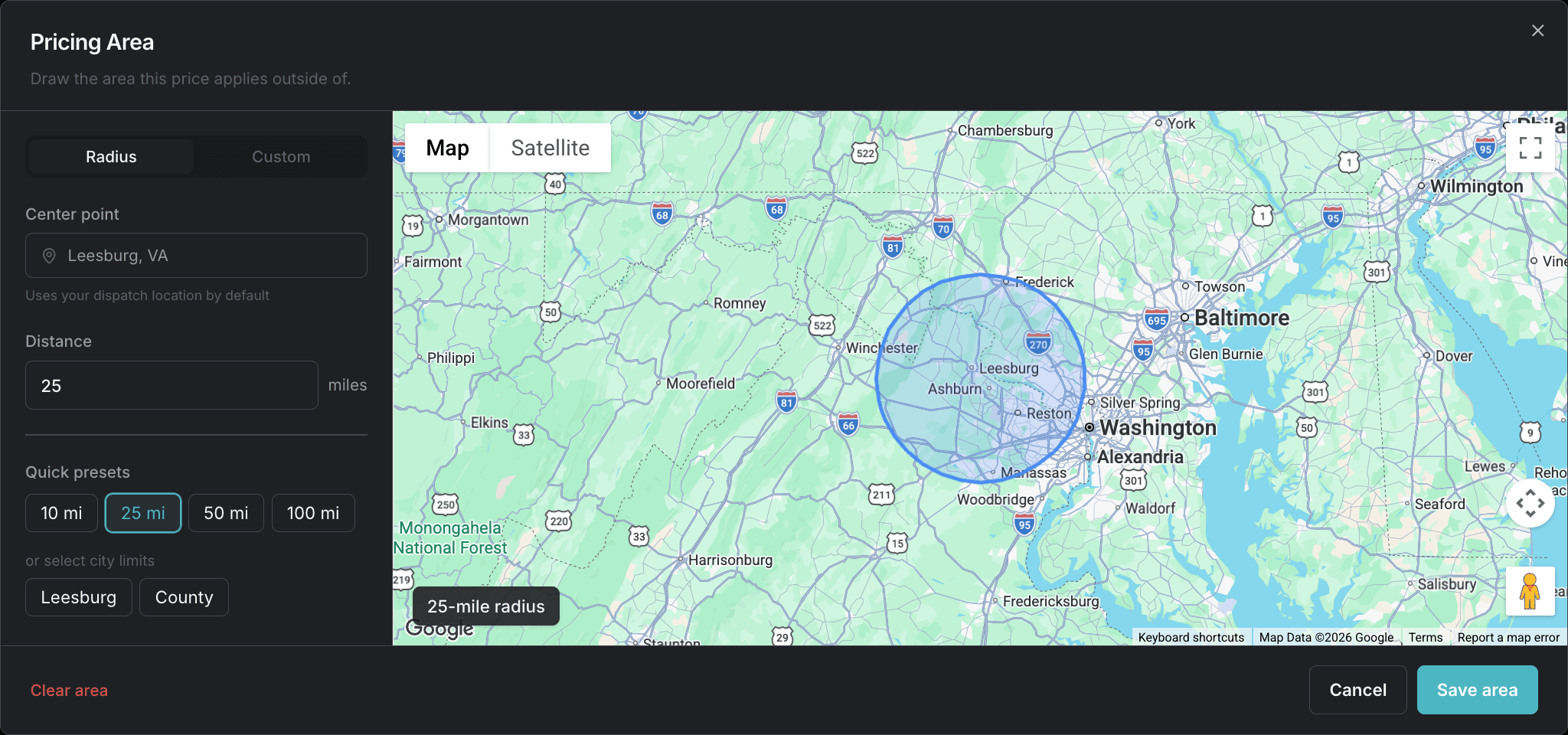
The tow, roadside, and surcharge builders also end with an Only apply based on location checkbox. Turning it on reveals a Check row and a map card. Pick Pickup location or Dropoff location, pick is inside or is outside, then click the card to draw the area. The roadside builder checks the pickup only, since roadside jobs take no drop-off address.
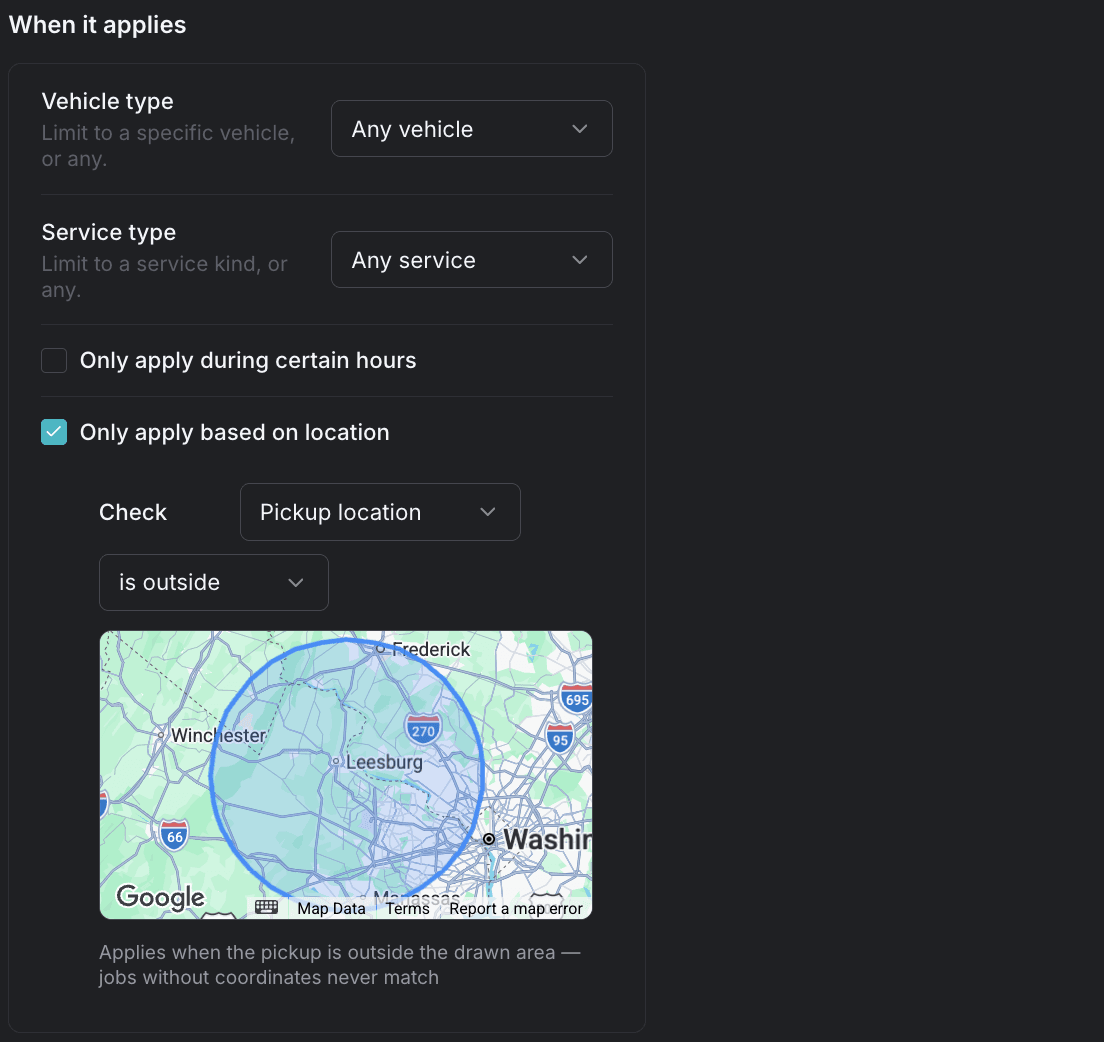
The Pricing Area dialog draws the area for you: a radius around your base (10, 25, 50, or 100 miles, or any distance you type), your city limits, or your county limits. Switch to Custom to click the points on the map yourself. An area needs at least three points, and Save area stays disabled until it has them.
The mileage builder has no location checkbox. On the custom form, set location with the Pickup location and Dropoff location conditions instead. See Fine-tune prices with custom rules.
is outside matches only jobs that have the coordinate and fall outside the area. A job with no drop-off address is not outside your drop-off area; it matches nothing.
Testing as you build
Each builder carries a test card beside the form, so you can price a sample job before you save. Nothing in the test card changes your rate sheet.
- Tow rates — enter loaded miles, then click Test for a single dollar figure. The en-route and deadhead boxes appear only when those extras are on, and the time box only when the hours restriction is on.
- Mileage — the preview prices 15, 30, 50, and 100 miles plus a distance you type, 45 miles to start. If every result is $0.00, the preview says the rule may not apply at that time and names the window you set.
- Roadside services — enter en-route and return miles; a flat fee with no mileage needs no test inputs at all.
- Surcharges — enter a subtotal, $100 to start, and the result shows the amount added and the percentage it came from.
A price limited to an area tests as a job that matches the area, and Test stays disabled until the area is drawn.
A worked example
Action Towing charges a hook fee plus mileage on tows, a flat jump start fee, and 10% more overnight. Four groups, in this order:
| Order | Group | What's in it |
|---|---|---|
| 1 | Hook fees | Light Duty base fee, $95.00 flat, towing only |
| 2 | Loaded mileage | Light Duty mileage, first 15 miles free, then $4.50 per mile |
| 3 | Roadside | Jump Start, $45.00 flat |
| 4 | Night surcharge | 10%, from 5:00 PM to 8:00 AM |
- A 25-mile light-duty tow at 10:00 PM: the hook fee adds $95.00 and the mileage adds $45.00, and the roadside group has nothing that fits a tow. The surcharge takes 10% of $140.00, so the quote is $154.00.
- The same tow at 2:00 PM: the surcharge's window doesn't match, its group adds nothing and doesn't appear on the quote, so the tow is $140.00.
- A jump start at 10:00 AM: both towing groups are limited to towing and add nothing, so the quote is the $45.00 flat fee.
Conditions beyond vehicle class, service, and hours — distance, weekends, holidays, accounts — need a custom rule. See Fine-tune prices with custom rules.