Notifications
The confirmation text customers get, the alerts your team gets, and the limits on both.
Notifications are the messages that go out when the AI Agent creates a new dispatch. They're a confirmation text to the caller, email or text alerts to your team, or both. Each one has its own toggle, and a channel you check needs at least one recipient before the page will save.
Go to AI Agent, then Notifications, where one Save changes bar at the bottom saves everything on the page.
Customer confirmation text
Notify customer on new dispatch (off by default) texts the caller as soon as the agent creates the job. The message names the customer, says where the truck is heading, gives the wait time, and thanks them by your company name:
Hang in there, John, help is on the way! Your Service Dispatch is heading to 1400 Elm Street. The estimated wait time is about 45-60 minutes. Thank you for choosing Action Towing!
The wait time comes from your Default ETA setting, not from a live estimate. Change the ETA and this text changes with it.
The wording is fixed; the toggle is the only choice here. For the ETA itself, see Dispatch settings.
Team alerts
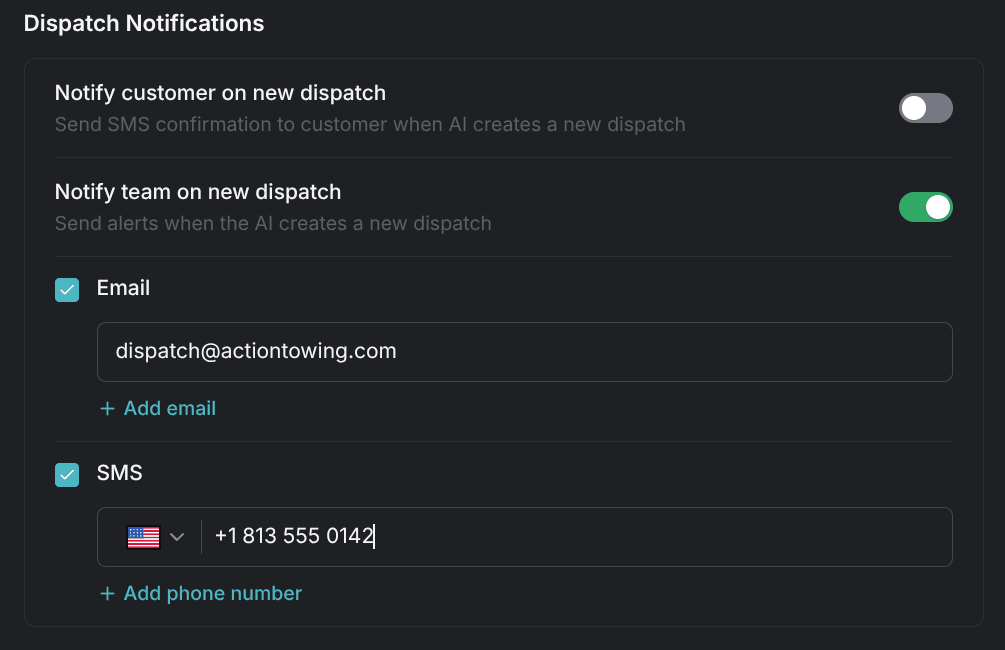
Notify team on new dispatch (on by default) alerts your dispatchers when the agent creates the job, through two channels you can use separately or together:
- Email — check it, then add addresses one per row with Add email.
- SMS — text alerts; check it, then add numbers one per row with Add phone number.
The email carries the whole job: the customer, the vehicle, the location, the problem, the customer's phone number, and where the vehicle is going. For what the agent collects before any of that exists, see How the agent handles calls.
A checked channel needs at least one entry, each list holds up to 10 recipients, and duplicate addresses or numbers are rejected.
Custom alerts
Custom alerts based on criteria (off by default), in the Additional Notifications card, sends email or text alerts whenever conditions you describe are met. List the conditions one per line under Notify when any of these happen, for example Heavy-duty tow is dispatched after hours.
Recipients work exactly as they do for team alerts: check Email, SMS, or both, and fill the matching list. The same limits apply: at least one entry per checked channel, up to 10 each, no duplicates.
If an alert you expected never arrives, see Troubleshooting.