How Digital Dispatch works
The two modes, the decision history, and how to see why a request was rejected.
Digital Dispatch reads each job request your dispatch provider sends, checks it against rules you write, and accepts it, rejects it, or leaves it for your team. Every request it checks is recorded with the decision and the reasoning behind it.
The record is the Digital Dispatch screen in the left-hand navigation. Everything you configure — the rules, the defaults, the hours — lives under Settings, then Digital Dispatch.
Learning mode and Live mode
Digital Dispatch runs in one of two modes, and every company starts in Learning mode. The mode decides only whether a decision reaches your dispatch provider; the checking and the recording happen either way.
| Mode | What happens |
|---|---|
| Learning mode | Checked against your rules and recorded, nothing sent to your dispatch provider. |
| Live mode | Checked and recorded, and the accept or reject response goes to your dispatch provider. |
A banner names the current mode at the top of the Digital Dispatch screen and on the General tab of Settings, then Digital Dispatch. The button that switches modes reads Go Live in Learning mode and Switch to Learning Mode once live. On the settings tab it sits in the banner; on the Digital Dispatch screen it sits in the table toolbar beside the status filter. Going live needs at least one rule, and a dialog asks you to confirm before decisions start going out. The full sequence is in Settings and going live.
The decision history
The Digital Dispatch screen lists every request Digital Dispatch checked, newest first, twelve to a page. New decisions arrive as they're made, and their row is highlighted for two seconds.
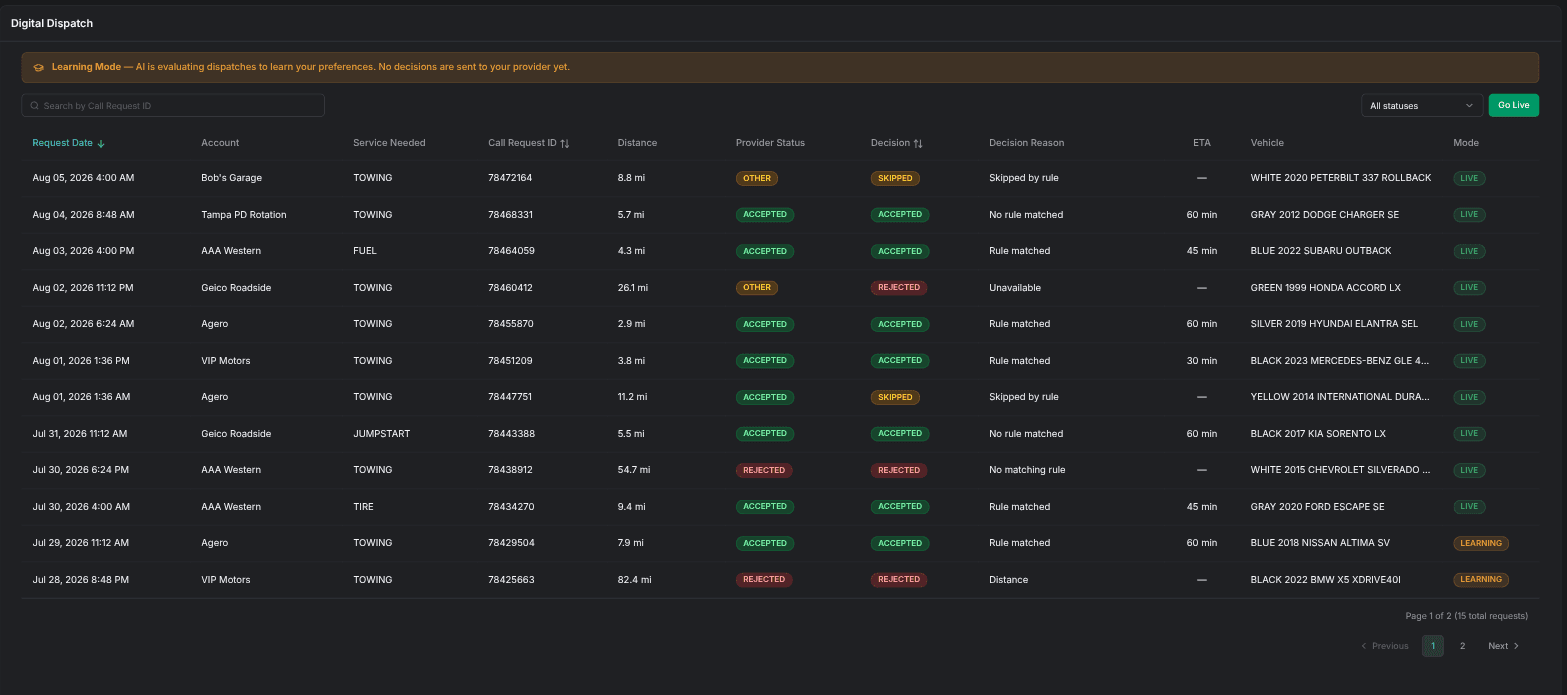
| Column | Meaning |
|---|---|
| Request Date | When the request came in, in your local time. Sortable, and the default sort. |
| Account | The provider account the request came from. |
| Service Needed | The service the request asks for. |
| Call Request ID | Your dispatch provider's identifier for the request. |
| Distance | The en-route distance in miles, as reported with the request. |
| Provider Status | What your dispatch provider ended up recording: Accepted, Rejected, Cancelled, and the like. |
| Decision | What Digital Dispatch decided: ACCEPTED, REJECTED, or SKIPPED. Sortable. |
| Decision Reason | The short reason behind that decision. |
| ETA | The ETA promised on an acceptance, in minutes. |
| Vehicle | The vehicle as your dispatch provider described it. |
| Mode | The mode in force when the decision was made: LEARNING or LIVE. |
Two controls narrow the list:
- Search by Call Request ID — type a request ID to pull up that one request.
- Filter status — All statuses (the default), Accepted, Rejected, or Skipped.
Decision and Provider Status answer different questions, and they can disagree. Decision is what Digital Dispatch worked out; Provider Status is what your provider ended up with, and it wins whenever a person acted first. A dispatcher who accepts during the processing delay leaves a row reading REJECTED against a provider status of Accepted.
An acceptance isn't the job. Your dispatch provider creates the job after the acceptance lands, and Digital Dispatch ties the request to that job once the job exists.
Requests that arrive outside your operating hours never reach the history at all. No rules run, so no row is written. See requests that never appear in history.
Inspecting one decision
Click any row to open its detail panel. Alongside the columns from the row, it carries the reasoning behind the decision:
- Decision Reason (Verbose) — the long form of the reason, where the column holds only a short one.
- Failed Rules — the rules that were checked and didn't match, which is how you tell whether your rule order did what you meant.
- Pipeline Duration — how long Digital Dispatch took to reach the decision.
- PO # — the purchase order number that came with the request.
- Starting and Destination, with En Route Distance and Loaded Distance in miles.
- Completed At, Created At, and Updated At — when the decision finished and when the record last changed.
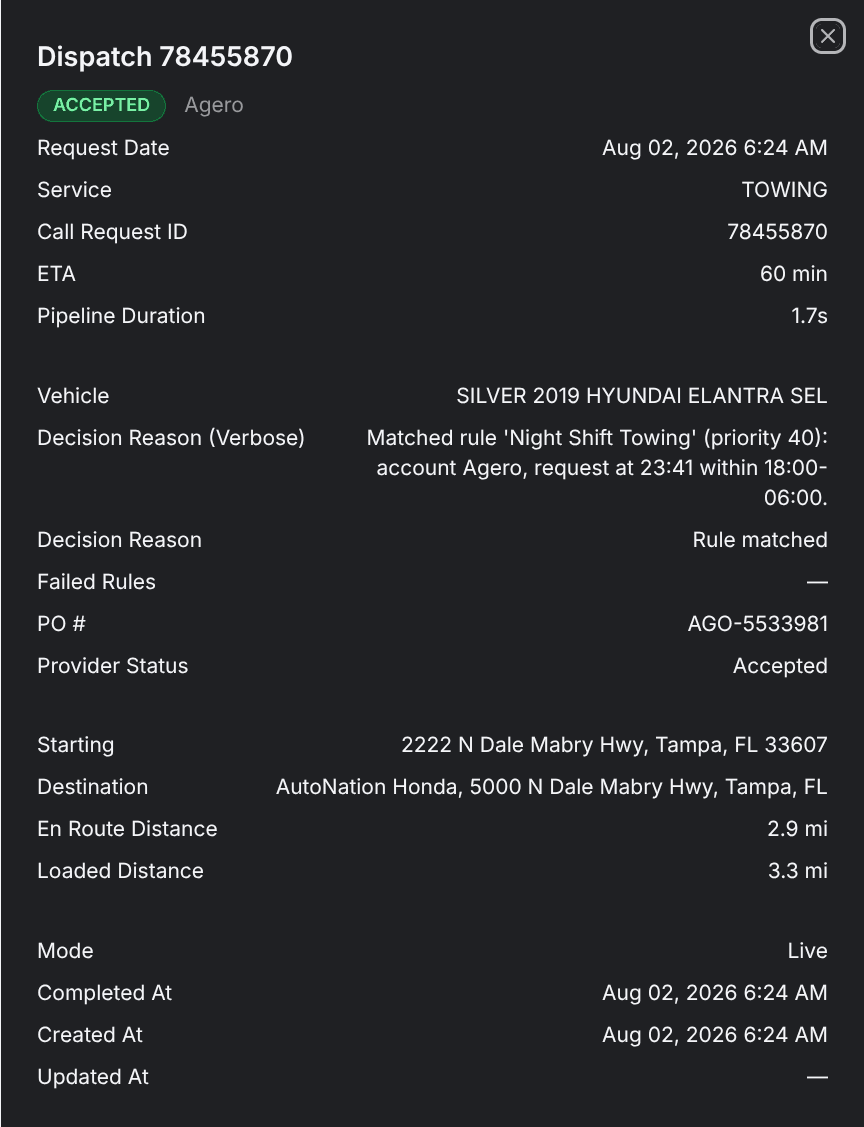
Reading these panels in Learning mode is how you judge your rules before anything reaches your provider. When a decision looks wrong, the trap behind it is usually listed on the rule-traps page.
Getting access
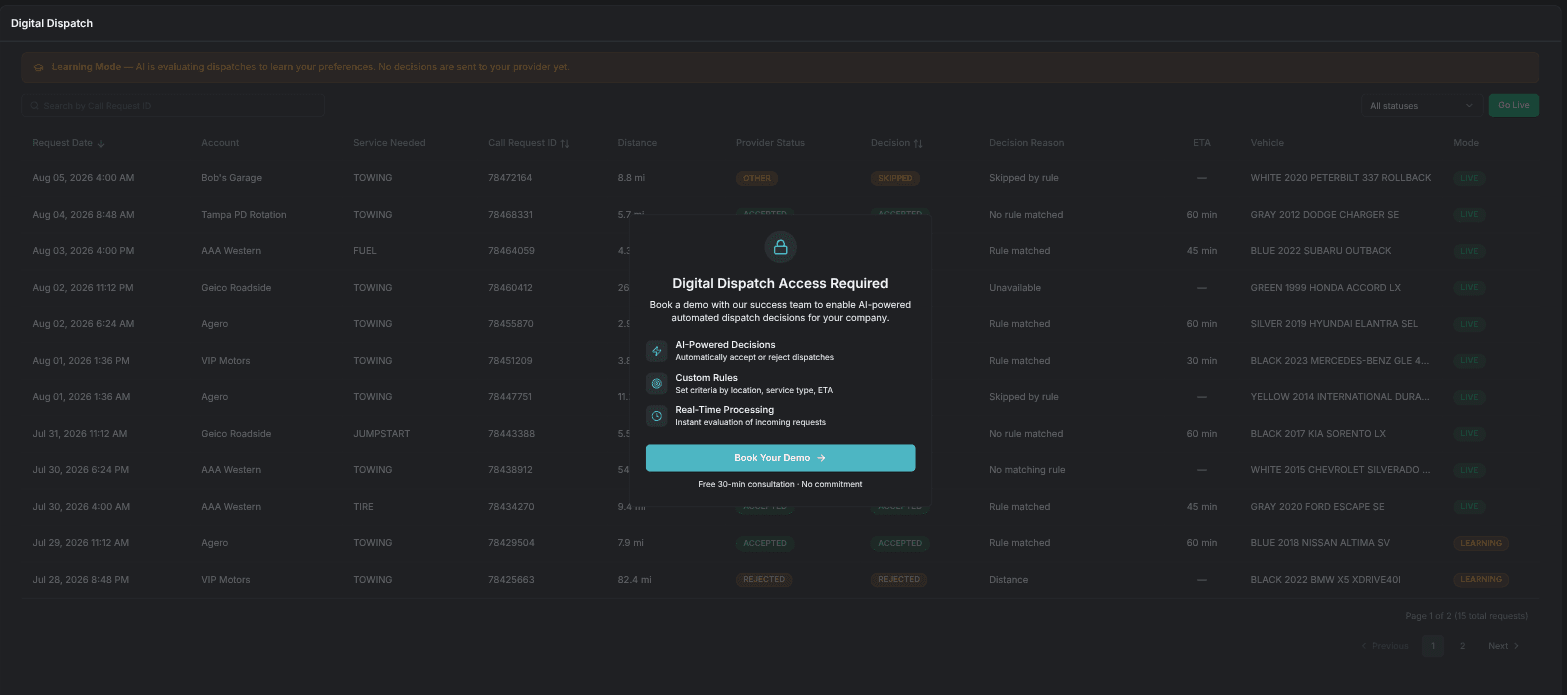
Digital Dispatch is turned on one company at a time, and it needs your dispatch software connected through a supported integration. Until it's on, the Digital Dispatch screens sit dimmed behind a Digital Dispatch Access Required panel.
Book Your Demo on that panel opens a scheduling page for a free 30-minute consultation with no commitment. Once you've picked a time, click Booked your time? Continue. The panel switches to Demo Scheduled and lists what comes next: a confirmation email, the call with the TowPilot team, then Digital Dispatch turned on for your company. If the panel reads Failed to verify access instead, Try Again re-checks.
Continue
Settings and going live
The global default, the processing delay, driver dispatch, operating hours, and going live.
Write acceptance rules
Every field of the rule form, how rules are ordered, and which rule wins.
Avoid rule traps
The rule-ordering and missing-data behaviors that surprise teams most, each with the fix.